.NET 10 · WINDOWS 10 / 11
HASS.Agent .NET10
A modern, lightweight Windows companion for Home Assistant: notifications, media control, sensors, commands and one-click updates.
or winget install v1k70rk4.HASSAgentNET10





What it does
Observe and control your Windows PCs from Home Assistant, split between an interactive tray app and an optional system service.
-
Notifications
Home Assistant notifications as Windows notifications or in an always-visible window of the app's own, with pictures, buttons and text replies that come back to Home Assistant.
-
Media player
The active media session in Home Assistant: play, pause, skip, volume and cover art. TTS announcements are heard even on a muted PC.
-
Sensors
Built-in system sensors plus your own: a process, a service, a drive, the output of a script, a LibreHardwareMonitor value. Fast, normal, hourly or startup polling, your choice per sensor.
-
Commands
Lock, sleep, shutdown, restart, and your own buttons: programs, PowerShell scripts, key presses, links. From automations or the dashboard.
-
Dashboard popup
Your Home Assistant dashboard in a small window above the tray, one click away. Or any page in a window of its own, like the camera when the doorbell rings.
-
Display and audio
The screen as a light in Home Assistant. Pick the default speaker or microphone, and set the volume of a single app.
-
Hotkeys
Give a key combination a name and it becomes an event in Home Assistant: start any automation from the keyboard.
-
Windows service
An optional system service handles what should work even when nobody is logged in.
-
Danger Zone
Opt-in toolbox: MQTT cleanup, live monitor, debug log, settings backup and restore, factory reset, beta updates.
Three ways to connect
Use whichever fits your setup, or let the app fail over on its own when you are away from home.
-
MQTT · local, through a broker
Fast, local auto-discovery through your MQTT broker (Mosquitto, for example). Every feature, and the broker keeps the last values through a Home Assistant restart.
-
HA WebSocket API · no broker, also from away
Over the Home Assistant WebSocket API, with no broker at all, also from away through Nabu Casa. Every feature, on its own or as the failover when MQTT drops. Works with a Home Assistant user of its own, no administrator's token needed.
-
Local HTTP API · fallback
A notification-only local endpoint for simple, direct setups.
What Home Assistant sees
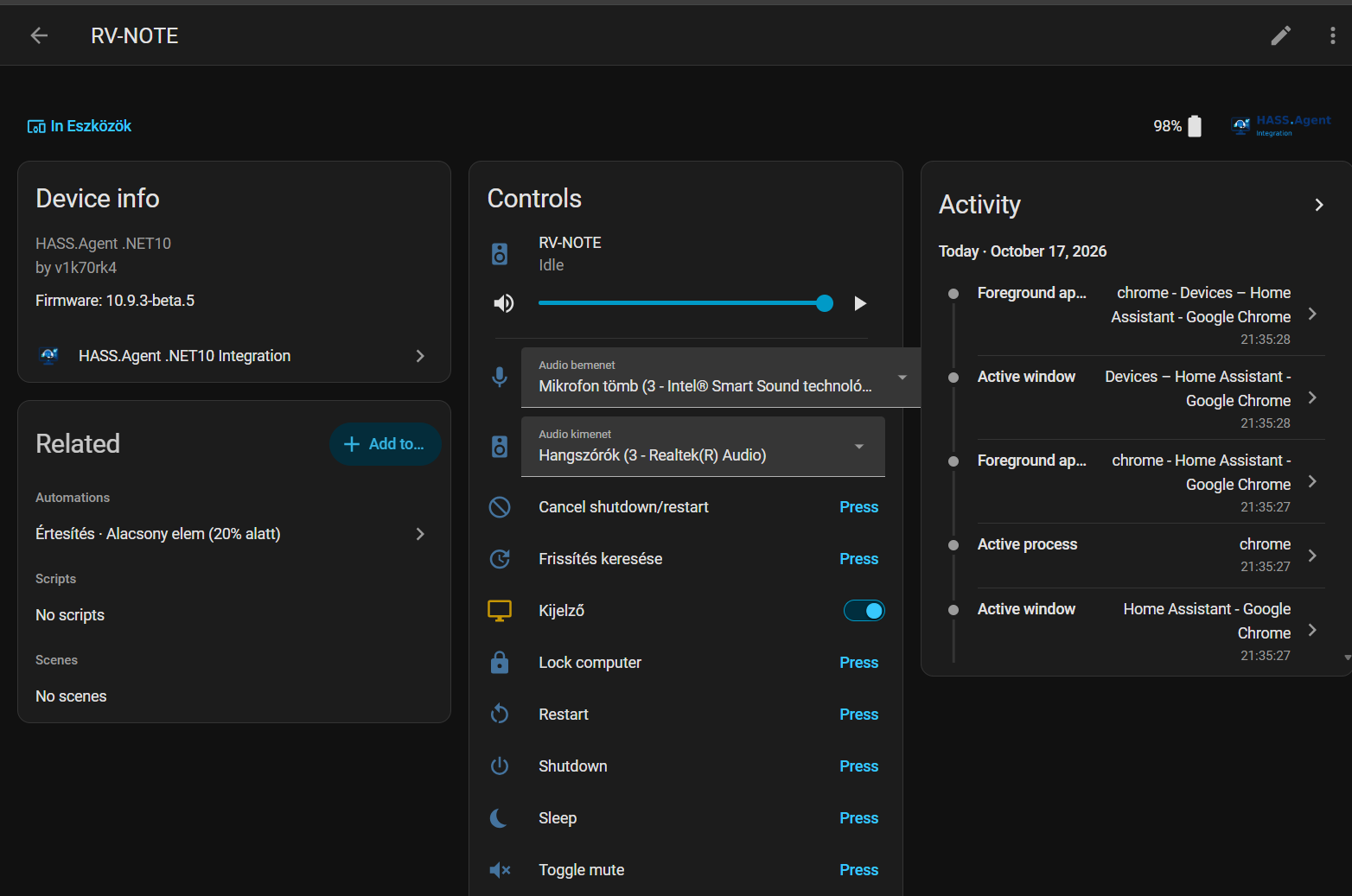
Every PC becomes a device of the integration, with its media player, sensors and command buttons, created from what the tray app and the service advertise. An entity is removed when neither of them offers it any more; while the PC is off, its entities stay and show as unavailable.
One-click updates from Home Assistant
The update entity has a real Install button. With the system service installed, updates apply fully silently: no UAC prompt, the tray app relaunches itself, and Home Assistant gets a persistent notification when it is finished. Only installers signed by the publisher are run. Opt into the beta channel inside the app to follow the pre-releases.
Built to be trusted
An app that can run commands on your PC and holds your Home Assistant token should not need blind trust.
- No administrator's token. Over the HA API the PC uses a Home Assistant user of its own, who is not an administrator, and only ever gets its own commands. How it works
- Who may use it on this PC. The settings, with the token and the commands, for every Windows user of the PC or only the ones you choose. More
- SYSTEM only with approval. The Windows service runs a command or script of your own only after an administrator has approved exactly what it runs. More
- Signed, and checked. Every release is code-signed, and gets Sigstore signatures once it is published; the updater runs an installer only with the publisher's valid signature. More
- Reviewed. CodeQL on every change, security reviews of the app, the integration and the release flow, the OpenSSF Best Practices badge and an OpenSSF Scorecard, and a private way to report a vulnerability.
Questions and answers
What is HASS.Agent .NET10?
A free, open-source Windows app that connects a PC to Home Assistant. Home Assistant can show notifications on the PC, control its media playback and volume, read its sensors (CPU, memory, battery, active window and many more), and run commands on it such as lock, sleep, shutdown or your own scripts.
Is it the same as the original HASS.Agent?
No. It began as a fork of HASS.Agent and has grown into a project of its own, built on .NET 10 with its own Home Assistant integration. The two do not share settings or entities. Coming from HASS.Agent explains what is the same, what is different and how to switch.
Do I need an MQTT broker?
No. The app connects over MQTT, over the Home Assistant WebSocket API, or both with automatic failover. The WebSocket API needs no broker and also works remotely, for example through Nabu Casa.
Which Windows versions does it run on?
Windows 11 and Windows 10 version 2004 or newer, on x64. The .NET runtime is included, there is nothing else to install.
How do I install it?
Install the HASS.Agent integration from the Marketplace in Home Assistant (HACS before 2026.11), then run the signed installer on the PC and enable MQTT or the HA API in the settings. On MQTT the PC turns up in Home Assistant on its own; over the HA API the first PC is added from the integration's Add device dialog. Get started has the steps.
Is it safe to give it my Home Assistant token?
The PC does not have to keep an administrator's token: with the integration 10.9.1 or newer it works with a Home Assistant user of its own, who is not an administrator. Give the app an administrator's token once and it creates that user with one click and switches to its token, or create the user yourself. On the PC the settings with the token can be limited to the users who need them, your own commands and scripts run by the Windows service as SYSTEM need an administrator's approval, and the app only installs updates signed by its publisher. See Security and privacy.
Is it free?
Yes. It is MIT-licensed, with no telemetry: the app only talks to your own Home Assistant or MQTT broker, and to GitHub to check for updates.